Steve Lu's Documentation Blog

  • Skip to primary navigation
  • Skip to main content
  • Skip to primary sidebar

Steve

Final Project: Final Individual Reflection

December 17, 2022 by Steve 1 Comment

矢量的警告标志图片素材-提防疯狗矢量警告标志插画-jpg格式- 未来素材下载

BEWARE OF THE DOG!

Ruilin Wu & Steve Lu

Instructed by Rudi

A. Conception & Design

1. Explanation of Concept

Actively engaging digital and analog media, Be Aware of the Dog attempts to provide a seamless experience for the audience to perceive a dog from two distinct perspectives. On top of that, the project ambitiously(boastfully) explores new forms of interaction. 

2. Conception

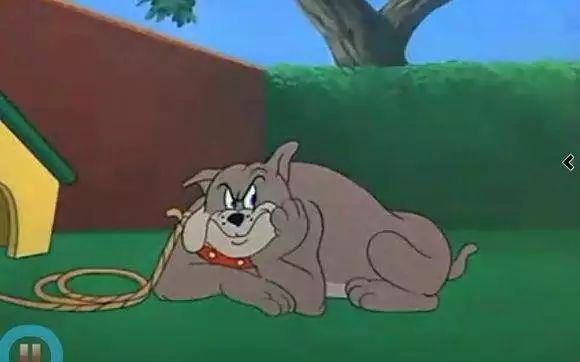
Tom and Jerry - Fit to Be Tied - YouTube

Initially, our idea was to make a physical fluffy dog and its digital twin presented on the screen. Unfortunately, we couldn’t justify the choice of having two dogs at the same time. During the talk with our instructor Rudi, I was inspired and proposed the idea of interacting with a digital dog with physical approaches, and later substantiated the approaches into pulling the leash and feeding bones.

The leash pulled my thought further to the cartoon series Tom&Jerry, in which I remembered a scene where Tom is pulling a long rope to him, believing there to be something good on the other end of the rope, while it turns out to be The Dog and Tom then gets his ass beaten up. The way Tom&Jerry play with the plot, setting up the suspense and afterward breaking your expectancy reasonably, gave me a hint on what we can achieve in our project. The dog should look huge and fierce in shadow, but eventually, turn out to be a lovely dog out of the shadow.


3. The Interaction Expected & The Corresponding Decisions on Design 

The interaction that we are trying realize is a unique interactive narration, with unexpected surprises, just like those one may encounter in Disneyland. We expected users to interact with our project through the leash and the bowl. We took the affordance of our design seriously.
In terms of the leash, we planned to have the leash pulled away from the user gradually, evoking their attention as well as interest in the leash. Later, we found it even better if some textual hint in the design could be involved. On one hand, textual information sets the tone and background of the interaction; on the other hand, texts should clearly anchor interactivity.
Moving on to the dog bowl, we thought the existence of a dog bowl should have given a message clear enough for the audience to feed the dog. We also hinted at the audience in other ways. A dogbone is hung on the dog’s house in the animation, which resembles the looking of the dogbone we offered our audience. Plus, the bones were put right in front of the dog bowl. On account of the above, just in case, we followed the same pattern and provided the audience with an extra textual hint on the screen.

4. User Test & Adaptions

The users learned about our project idea, tested the food bowl, and viewed the animated pictures during the user testing session. In all honesty, the suggestions and comments made by the users are very motivating. Margaret, the instructor, advised that we consider what feelings the users would have that might motivate them to take the second step. In order to prevent users from being scared away by the prior ominous shadow and refusing to feed the dog, we made the adorable puppy leave the house before they could feed it a bone. However, one student questioned how the prompts would fit into our project. We gave it some considerable thought. Using inspiration from the video game Minecraft, we gave the puppy values for hunger and happiness, showing when it is in that state and prompting people to give it a bone. It turns out that both modifications work well and are successful.

One of the things that we were really hesitating about is whether we should leave a hole in the middle of the dog bowl or not. Leaving a hole there adds extra clarity for users to interact with, but somehow isn’t cool enough. Not leaving the hole then requires another mechanism to move the cover around for the bone to drop. We decided to consult our users regarding the unsettled dispute. We’ll discuss this in the following section.


B. Fabrication & Produciton

1. Animation

We started to produce the animation first, and didn’t finish it till very late. Given the notable significance animation played in our project, we put some effort into it. The first technical solution we turned to is Adobe Character Animator, in which I created a puppet whose limbs can be maneuvered around and whose head can tilt corresponding to the movement of my head. The solution was pretty mature except for its particular movement as a four-leg creature. I mean, the three legs that you can see here worked perfectly. The sad thing is that the hidden fourth leg didn’t always disappear. When the puppy moves around, his legs work in turn. My limited technical capability couldn’t solve the temporal overlapping.

So, instead, Rin decided to draw the animation out frame by frame. It was a painstaking process which I will not elaborate on here, but her hard work should be appreciated. Anyway, in terms of the design, there were a few things on the layout that we were extra cautious when dealing with:

Backdrop. We tried to keep the background simple so that users wouldn’t be distracted.

The grass. Rin painted the grass this way specifically to fit the physical grass, that we bought to lay on the table.

Dog house. We put the house right in the front, instead of somewhere far away. We preferred it this way because we wanted the audience to feel as if the interaction were happening right in front of them, at the intersection of the grass.

Movement of the dog. The exact position where the dog stops to eat is designed to fit the location of the actual dog bowl.

The anger & hunger progress bar.Tiny floof has a big angry - I Has A Hotdog - Dog Pictures - Funny pictures of dogs - Dog Memes - Puppy pictures - doge The idea is proposed by Rin. She felt there lacked a smooth transition between the angry dog and the hungry dog. Similarly, during the user test, professor Margaret Minsky also pointed out the discontinuity in emotion.

Why would people want to feed a dog that looks aggressive?

Taking them into account, genius Rinrin came up with the idea of hunger and anger value, giving a crystal clear message that the dog is hungry. Besides, throughout the design, we spared no effort in making the puppy as adorable as possible. You know when puppies get super cute, even their aggression and offense could be interpreted as being cute. Fair enough, people should like to soothe an angry cuuuutttteee puppy. Consequently, we were convinced that the contrastive transition from scary dog to cute puppy ought to have debunked the fear already.

You can picture how people would sigh with relief seeing the cute puppy running out, can’t you?


2. Leash

I have always wanted to make users feel like there’s a real dog at the other end of the leash. So, I borrowed a stepper motor from the equipment room. The reason why I went with the stepper is that the servo motors available were not powerful enough to pull the leash. Though perhaps I could have bought some better motors online, I slacked off a little bit and turned to the easiest way out.

Initially, I tried to control the output of the motor according to how much the user was pulling the leash against the motor. I thought about quantifying the power of the motor’s use. Unfortunately, as I looked into the detailed mechanism of the stepper, I found it completely over my head. There is a lot of intricate physics involved and I couldn’t be sure how the power of the motor varies according to the load. Though I may look into them or conduct some experiments to figure it out myself, I rejected the proposal because of the tight schedule. Similarly, I considered using a force sensor to do the work, but the only available type of force sensor here was a pressure sensor. They don’t work well in my situation.

So, the alternative I thought about to sense the pulling of the leash is to measure its displacement, for which I pictured two ways.

First, is to use a potentiometer. 

Amazon.com: HATCHBOX 1.75mm Black PLA 3D Printer Filament, 1 KG Spool, Dimensional Accuracy +/- 0.03 mm, 3D Printing Filament : Industrial & ScientificI took the empty roll of the 3D printing filaments and found that they may serve as a perfect pulley for the leash. I would be able to know how far the user had pulled the leash if I rolled the leash around the filament role and mounted the whole structure to a centered spindle whose axis is connected to a potentiometer, as well as the stepper motor. Although the stepper could only turn the roll for one revolution due to the structure of the potentiometer, it will allow the leash to travel a remarkably long distance, if the roll is big. Eventually, the plan was abolished because I was afraid that the stepper motor may not be powerful enough to drive the whole, as I thought about its feasibility in physics.

Secondly, plan B, also the one I actually adopted in the presentation of our project, is to use a sliding rheostat. No longer had to worry about the turning limit of the potentiometer, the design largely alleviated the burden on the stepper motor, while running the risk that only a limited amount could the leash be pulled. A string connects the end of the chain, tied around the slider, and is attached to the stepper’s turning wheel. Here’s how it works. In its position by default, the slider is placed down its end closer to the stepper. When the leash is pulled, the string pulls the slider towards the other end of the bar. Once it reaches the end of the bar, it triggers a signal for processing to start the play (namely jumping the video to where the second stage is). Meanwhile, the signal also triggers the stepper to pull the leash back, which 1. stop the signal 2. prepare the mechanism for next interaction. 


3. Dog bowl

The magic of our project is all hidden inside the dog bowl. Its function is quite straightforward, taking the bones in and nothing else. Notwithstanding the simple job, you may find the bowl quite intricate. So frankly, I did run a bit off the trail on the way and wasted some time and materials. Why don’t I tell you the story bit by bit?

  • Dog bone

It all began with the dog bone in the design. In the hopes that the 3D printer would produce a realistic, adorable puppy on the bone, I altered the size of the library model before engraving it on the bone. Naturally, things just became blurry. This demonstrates that the accuracy of 3D printing is fairly constrained. The fine detail might not be portrayed the way we would like. In addition, there is no way that you cannot notice the layers here. I took my time polishing the bones. Frankly, given how minor of a part bones are playing in our project and how much time I invested, it’s not the best use of time. There was unquestionably a mismatch.

  • Detector

The detector I conceived while cooking the bones was an FSR (pressure sensor). Honestly, it was the very first thing I made throughout the project. I checked its parameter and decided to connect the FSR in series with a 1Mohm resistor so that the voltage would show a difference, big enough to be told by Arduino Uno. That’s not wise work, as I reflected on it right now. Two reasons. 1. I spent two to three hours that afternoon, trying to solder everything together. I personally graded the work inefficient because I didn’t know the perfect soldering environment in 823 at that time, and I wasted much time perfecting the solder, which ALWAYS makes things much worse; 2. Despite all the effort, the bone wasn’t heavy enough to trigger a proper response in the FSR. (I thought about embedding a metal component in the middle of the bone during the printing). Even if it worked, the response curve of resistance is initially non-linear, thus it will quickly increase, adding more difficulty. 

I then began looking for another alternative. It seemed like a decent idea to use this IR sensor. I gave it a try and it worked well. In order for the sensor to function, an infrared beam must be emitted. An adjacent infrared-sensitive diode must then catch the reflected beam and convert it into an electric signal. The sensor can therefore determine when an object is positioned close to its front. Turning the blue knob specifically changes the distance threshold. So I worked hard (maybe for an hour) to desolder the diodes and extend them with cables. It performed flawlessly. I then built a sensor hold according to their sizes. The hold, which serves as the bowl’s bottom, was then easily fitted with them within.


  • Servo

The bottom of the bowl, as well as the sensor, are connected to the servo attach. When it senses the coming of the bone, the servo automatically moves the arm aside, and letting the bone in. The cables goes alone the arm and are then connected to the board.


Of course, the bowl is specifically designed to fit my partner’s head.


——————Illustrations down below for better and clearer understanding——————


C. Conclusions

  • Success? Goal Achieved?

The goal of the project is to bridge the virtual and the physical. Through physical actions, the audience can interact with the world within the screen. Then, what happens within the screen serves as feedback to the audience, encouraging them to take further actions. Specifically, we want the audience to interact with the project exactly the way how they would act in real life. In more tangible terms, they are pulling the leash and feeding bones, instead of pressing buttons or so.

I would say the project was a success. Through the hints and the affordance developed purposefully, audience largely followed our design, and carried out the whole interaction. Moreover, from how thrilled they appeared to be, I believed a bond had been built between them and the virtual puppy. Eventually, both users executed the interactions as we planned, and the puppy got successfully returned to his home, full and satisfied.

👇don’t miss it!!! (video nicely embedded by Rin)

P r e s e n t a t i o n


  • Improvements?

One of the major improvements could be with the leash. As suggested by Rudi, the current design probably isn’t optimized. For instance, the chain leash and the rheostat are connected rigidly, which is potentially perilous to the project. On account of the great possibility, the audience pulls hard against the leash, and adopting a hard-wired linkage runs the risk of breaking things off. Rather, Rudi suggested the design shown in the diagram (if I understood it correctly). Attaching the chain to a spring and a strong servo subtly bypasses the jeopardy we mentioned above. Moreover, given Hooke’s law (namely the spring extends when it is pulled), adopting the spring here permits an extended redundancy for the audience to pull.

  • Lessons?

There are many lessons that I learned throughout the project. Some with the techniques, and others with the time management skills in making a project.

1. 3D printing

I learned how to design in 3D and prepare the model in slicers, though those skills are immature still. Many of the designs could have been optimized. As for the base shown here, given the size, I went for an infill of around 5%, which did save some time but sacrificed the smoothness of the surface as well as the strength. Andy, professor Garcia from the fabrication lab then suggested that I could actually make the thing hollow, and print it with a higher infill, which saves the material and time, and produces a structure with guaranteed strength and smoothness.

The other thing I learned is that printers run with tolerance. The model I designed, which should perfectly hold the Arduino Uno, the sensors, or even the servo, didn’t fit in. They were bigger than I thought. Fortunately, this can be solved. I heated them up with a heat gun and inserted the components, while the PLA shrunk as it cooled down, it squeezed into those components and produced a better stiffness. Well, also, unfortunately, that didn’t work well with the servo hold. As I made the sides too thin and without proper reinforcement on the outside, the whole top fell off. So, eventually, I heated up again and stuck it back in. Afterward, I simply wrapped it with tape.

2. Soldering

I believed I had to utilize a H bridge because I used a stepper in the project. Soldering the chip to the shield and all the extended wires took a lot of my time. Despite the lovely work, I could just as easily use a drive board. I’ve learned from this experience to never create a wheel from scratch again if it is already made.


  • Final Say

Humans interact THROUGH technology,

rather than humans interacting WITH technology itself.

———  Edmonds, 2011

Wow, exactly what we want to achieve in the project. A seamless experience of blending the digital and the physical, as I denoted somewhere above, is our ambition. And standing here, I’ll say we have achieved the goal (most of it, if you find it boastful). In making the project, my partner and I dedicated ourselves to hide the technology, from the dog bowl, to the digital puppy.

We place a strong focus on interactivity to make the feeling that you are actually standing here on the lawn squarely in front of a dog house. Particularly, we covered the table with fake grass and other props, and concealed the motors, and wiring, in order to lessen the presence of technology and utilize it as a tool for engagement rather than the actual act of interaction.

On top of that, our project succeeded in attracting the audience’s attention and sustaining it. Let’s talk about how attractive it is. Undoubtedly, our project looks appealing and distinctive. It’s appealing because of the setup, it takes up an amount of space, creating a magic circle around the lawn. Bones, dog bowl, and leash scatter among. It’s distinctive because of the setup, we don’t have a wooden box on the table. Instead, what you see is what you see. Every single thing on the lawn could be a prop.

Then how it sustains attention then? To actively keep the audience involved, we created progressive interaction. The value of hunger and happiness, for instance, will continue to decline if the user does nothing and the puppy is unable to receive its food. On the other hand, if the user gives the puppy a bone, the dog will become joyful. This is saying that the circumstances are determined by user behavior.

I’ve come to realize how important collaboration is while completing a challenging and intricate assignment. We clearly divide up the work, but Rin and I also appreciate each other’s opinions. We never hesitate to solicit one other’s perspectives when it comes to significant issues that fall within the purview of our duties, coming to an understanding prior to beginning the task. In general, it was enjoyable to work with her.🙂

—This Is It!—

—Farewell To the Unbelievable Semester, and The Interaction Lab—

D. Annex

Processing Code

import processing.serial.*;
import osteele.processing.SerialRecord.*;
import processing.video.*;

Serial serialPort;
SerialRecord serialRecord;
Movie video;

PFont cute;

int state = 2, bone_state, pull_state;
boolean runChecker1 = false;
boolean runChecker2 = false;

void movieEvent(Movie m) {
  m.read();
}
void setup() {
  cute = createFont("BalonkuRegular-la1w.otf", 128);
  frameRate(25);
  imageMode(CENTER);
  background(0);
  //fullScreen();
  size(1920, 1080);
  textFont(cute);

  //String serialPortName = SerialUtils.findArduinoPort();
  //serialPort = new Serial(this, serialPortName, 9600);
  //serialRecord = new SerialRecord(this, serialPort, 2);
  //serialRecord.logToCanvas(true);

  video = new Movie(this, "video.mp4");
  video.loop();
}

void draw() {
  println(video.time());
  //serialRecord.read();
  //int pull_state = serialRecord.values[0];
  //int bone_state = serialRecord.values[1];
  
  if (pull_state==1) {
    state = 1;
  }
  if (bone_state==1 && state==1) {
    state = 2; 
  }
  
  // sleep by default
  if (state==0) {
    if (video.time() > 3) {
      video.jump(0);  
    }
    image(video, width/2, height/2);
    tint(255, 50);
    if (video.time() % 3 <1) {
      sleep();
    }
  }

//  // pull leash enter anger angry and come out
  else if (state==1) {
    image(video, width/2, height/2);
    if (runChecker1==false) {
      video.jump(3.2);
      runChecker1 = true;
      }
    if (video.time() > 20.8) {
      feed();
      video.jump(19);
    }
    if (video.time() >19) {
      tint(255, 99);             
      feed();
    }
  }

  //go for bone and return
  else if (state==2) {
    image(video, width/2, height/2);
    if (runChecker2==false) {
      video.jump(21);
      runChecker2 = true;
    }
    if (video.time() > 38) {
      runChecker1 = false;
      runChecker2 = false;
      delay(5000);
      video.jump(0);
      state = 0;
    }
  }
}

void feed() {
  textSize(80);
  text("Puppy's not happy,", 0.58*width, 0.53*height);
  textSize(65);
  text("Why not", 0.58*width, 0.63*height);
  text("him something?", 0.68*width, 0.72*height);
  textSize(135);
  text("feed", 0.76*width, 0.64*height);
}

void sleep() {
  textSize(80);
  text("Puppy's sleeping,", 0.62*width, 0.3*height);
  textSize(180);
  text("PLZ!!!", 0.62*width, 0.48*height);
  textSize(80);
  text("don't pull the leash,", 0.55*width, 0.59*height);
  text("it'll disturb him!", 0.55*width, 0.67*height);
}

Arduino Code

#include <Stepper.h>
#include "SerialRecord.h"
#include <Servo.h>

Servo myservo;  

// for serial record setup
SerialRecord reader(1);
SerialRecord writer(2);
int slide; // from sliding resistance, know how much it goes
int bone_state = 0; // to send whether there's bone in the bowl
int pull_state = 0; // to send whether the leash is pulled enough
bool infra = true;

bool runChecker = false;
unsigned long time;

// for stepper setup

const int stepsPerRevolution = 200;  // change this to fit the number of steps per revolution
// for your motor
// initialize the stepper library on pins 8 through 11:
Stepper myStepper(stepsPerRevolution, 8, 9, 10, 11);

void setup() {
  Serial.begin(9600);

  myservo.attach(12);

  // set the speed at 15 rpm:
  myStepper.setSpeed(15);
}

void loop() {
  leash(); // control stepper motion
  boneCheck();
  writer[0] = pull_state;
  writer[1] = bone_state;
  writer.send();

}

void leash() {
    // step one revolution  in one direction:
  slide = analogRead(A0);
  if (slide==1023) {
    pull_state = 1;

    // for the stepper motor to pull the leash back a bit
    step();
  }
  else {
    pull_state = 0;
  }
}

void step() {
  // step 1/100 of a revolution:
  if (!runChecker) {
    time = millis();
    ! runChecker;
  }
  while (millis()-time<=5000) {
    myStepper.step(stepsPerRevolution / 100);
  }
}

void boneCheck() {
  if (infra==true) {
    infra = digitalRead(3); 
    myservo.write(140);
    runChecker = false;
          // Serial.println(infra);
  }
  if (infra==false) {
    if (runChecker==false) {
      time = millis();
      runChecker = true;
    }
    if (millis()-time<3000) {
      myservo.write(180);
      bone_state = 1;
    }
    if (millis()-time>=3000) {
      myservo.write(140);
      bone_state = 0;
      Serial.println("ueeu");
    }
    if (millis()-time>=4000) {
      infra = true;
    }
  }
}

Filed Under: Final Project

Digital Project

December 11, 2022 by Steve Leave a Comment

Scratch

Progess in video so far

(some parts don’t align with the scratch as they are still subject to change)

This video should have been uploaded to bilibili and Chinese subtitile should have been added.

https://wp.nyu.edu/nyushanghai-wenbolu/wp-content/uploads/sites/25197/2022/12/scratch.mp4

Something I think that can be IMPROVED:

The pace of talk, maybe a bit slow, not fitting the urgency of young people.

The tone of talk, maybe a bit low, and lack of varying intonations, that may sound sleepy.

The part from interviewee is redundant, could be shorten to a sentence or two, then combined with quick analysis.

Filed Under: Recitation

Recitation 10: Image & Video

December 7, 2022 by Steve Leave a Comment

The function that I would like to realize here is to let the sliding rheostat to control the progress of the video.

I used analogRead(A0) to obtain the position of the slider and sent it to processing. In processing, I first obtained the duration of the video via video.duration() and then remaped the voltage value from arduino corresponding to the duration of the video as a float object. Afterwards, video.jump() method helped me to get to the position where the slider is corresponding to in the video.

What I noticed in the process is that the jumping wasn’s smooth at all. It was lagging. What I thought to be problem, probably, is because the scale, from 0-1023, is much too sensitive to control the video, as it may cause unnecessary fluctuation. So, maybe a clean solution to it is to resample the value and downscale it a little bit.

Also, I have tried using mouse position to control the video. It worked fine except for the lagging problem.

Code attached below:

import processing.serial.*;
import osteele.processing.SerialRecord.*;
import processing.video.*;

Serial serialPort;
SerialRecord serialRecord;
Movie yes;

float dura;

void setup() {
  imageMode(CENTER);
  background(0);
  fullScreen();
  //size(1920, 1080);
  
  String serialPortName = SerialUtils.findArduinoPort();
  serialPort = new Serial(this, serialPortName, 9600);
  serialRecord = new SerialRecord(this, serialPort, 1);
  
  yes = new Movie(this, "timelapse.mp4");
  yes.loop();
  dura = yes.duration();
}

void draw() {
  // Ratio of mouse X over width
  //float ratio = map(constrain(mouseX, 320, 2240), 320, 2240, 0, 1920) / 1920;
  serialRecord.read();
  int value = serialRecord.get();
  float ratio = value / 1023;
  
  yes.jump(ratio * dura);
  println(constrain(mouseX, 320, 2240));
  image(yes, width/2, height/2);
}

Filed Under: Recitation

Final Project: Proposal Essay

November 25, 2022 by Steve Leave a Comment

BEWARE OF THE DOG!

Purpose 

Actively engaging digital and analog media, the project attempts to provide a seamless experience for audience to perceive a dog from the two distinct perspectives. What we are trying realize is a unique interactive narration like those in Disneyland. The project should be engaging to audience who are willing to explore.

Creative Process

Initially, we were thinking about a digital twin of a physical fluffy puppy that somehow viewers can interact with physically so as to provide them comfort. During the process of nailing the terms down, we noticed the dislocation, namely why two dogs? We proposed several ways to coordinate the two, as synchronizing their movement, or replacing the puppy’s eyes with an ultrasonic radar to know the viewers location so that they can both follow. Still, the problem remained unsolved. Why are there two puppies around? How can we make sense of one dog in the context of another? Is it the out-of-body spirit of the physical dog? Or the physical embodiment of the ghost dog? We found it uncanny in either way.

猫和老鼠里打一手好酱油的大狗,你还记得吗?

Thus, I started to brainstorm on how to solve the discontinuity in interaction. Is there anything that we can interact with a dog without direct physical contact with its body? Eureka! The creativity emerged out of nowhere. It was The Dog, appearing in Tom&Jerry cartoon, that suddenly occurred to me. I recalled the iconic collar around his neck, and how he’s always tied to a tree or his dog house with a leash. To be more specific, I remembered a scene in which Tom is pulling a long rope towards him, believing there to be something good on the other end of the rope. Unfortunately, it turned out to be The Dog. Tom then gets his ass beaten up.

In short, leash is the key to the question!

Plan

The overall setting

A TV stand suspends the TV half way in the air. A large table is arranged closely in front of the TV, with a particular height that has its top perfectly aligned with the content that is displaying. 

The TV presents a cartoon-like scene, with a dog house in the middle on a lawn. Coordinately, a piece of lawn is going to be laid on the table, pretending as if the table is a seamless extension of the space inside the screen. (One alternative, that Rudi proposed, and is super cool but I haven’ think about it thoroughly yet, is that, for the animation that we are playing in the screen, shooting through a window. In this way, we make active use of the sense of seperation created by the flat sense of the television, and subtly involve it as part of the experience).

A chain leash, extending from the dog’s house to the audience, is connected to a strong motor under the table. The self-feedback motor should give the mechanism the ability to mimic the movement of a dog, so that the viewers feel as it there were a real dog at the other end of the leash. The TV display coordinates with the leash, responding to viewers’ pull, by animating the shadows of the dog, or by vocalizing its growling.

A dog’s bowl, placed on the table, is specially designed. Once dog food (or maybe dog food analog, not intending to make audience’s hands stinky with that Lmao) is placed into the bowl by the audience, it senses and automatically open its bottom so that the dog food falls in and disappears. Magically, the dog food will reappear on the screen! Subsequently, the digital dog will run out, swallow the food, and run back to its house.

How to make it happen?

The two major challenges is clearly stated.

One, is the animation.

The other, is the leash. 

Character Animator CC 2019 in Hindi: 4 Leg Animal Character Walk Cycle Step by Step - YouTube

In the preliminary stage of my research, I noticed some software like Adobe Character Animator. The software provides powerful functions for 2D animation production. On the top of that, there are many tutorials available online. 

So, for the next few weeks, we’ll try to get our hands on the software and experiment what we can do with it.

In terms of the leash, I have come up with several potential technical solutions. I’ll reach out to the professor to nail down which exactly we are goning to use in the following weeks. Another more crucial aspect of the leash is that the experience matters. Since we plan to make an illusion that there’s one dog over there pulling against you, definitely we have to study its pattern, plus doing multiple user tests to see if we are getting what we want. We’ll be invested in refining the experience.


Filed Under: Final Project

Recitation 9: Digital Fabrication

November 25, 2022 by Steve Leave a Comment

Design 

Attached to the shaft

– by me

I tried to make the most use of the materials. So, I designed something for myself in the blanked area. 

And the most important lesson that I learnt in the process, reminded by Andy, is that for laser cutting we should be extra cautious with the font that we’re using.

Fonts for laser cutting Stencil


And stencil is thus a good option, avoiding the middle of the texts to fall off.

Attach to the stand

– by Rin


Laser Cut

Engraving mode.

The movement of the printer nozzle is shify. It’s pretty amazing thinking of how the motors exhibit great precision in such a high speed.

https://wp.nyu.edu/nyushanghai-wenbolu/wp-content/uploads/sites/25197/2022/11/3b96bf47056b24d8b42d7f91065003d1.mp4


Cutting mode.

There’s nothing surprising with the cutting, though it’s undoubtedly spectacular. And also, it smells smoky. On the top of that, there’s inevitably trace of burning all along the cut. We have to polish or wash them off. Though this may be equally another kind of aesthetic.

https://wp.nyu.edu/nyushanghai-wenbolu/wp-content/uploads/sites/25197/2022/11/4c8a3feda51492e387a7ab63bf621db0.mp4

All wrapped up

This looks kinda amazing, though it’s not necessarily an interfering pattern. One way to make it more impressive, is perhaps turning it faster. However, I am not sure how to realize that on a servo motor. So, I decided to leave with what it is right now. At least we grasped a basic idea of how digital fabrication work, partially.

https://wp.nyu.edu/nyushanghai-wenbolu/wp-content/uploads/sites/25197/2022/11/7a473c26d5bd622388b94b21efb7e87b.mp4


Filed Under: Recitation

Final Project: Three Project Proposals

November 21, 2022 by Steve Leave a Comment


See! Firworks!


This project visually reproduces fireworks. From how we light it up, how the blasting fuse burns, to how the fireworks explode in the sky, the project aims at providing viewers with an immersing experience of setting off their own fireworks. 

The preoccupied target audience is Shanghainese and those Chinese living in the big cities, while others could also be involved as potential audience. Since the introducing of fireworks ban, fireworks and firecrackers have then been removed from our life. However, the ritual has been part of our culture and our unique experience of growing up as a kid in China, especially during the Chinese New Year.

I have few knowledge about the categorization of interactive design. So, I cannot really name it here. 


You Are What U Speak


This project predominantly focuses on the inextricable link between one’s identity and his speech.

Through real-time figure capture, deconstruction, and reconstruction using fragmented texts, this work of art scrutinizes the duality existing in the connection. Not only we subliminally modify our behavior—and even our thought processes, according to the language we speak, but also the way we talk to others forges their perception about us.

In terms of the art, viewers per se are granted the chance to take a deeper look at themselves from a brand new perspective. Plus, the experience of seeing their textual figures visioned by others creates a visual echo with the perceptual point of view.

Perhaps this work of art falls into the category of conceptual art. 


How Well Do U Know


This project is a refined version of the midterm Match Maker project. This helps couples, friends, or even parents and children to test how well they know about each other. Inspired by Rudi, the targeted audience of the project is no longer limited to lovers that are eagar to express their love. Instead, the project aims to create chill experience for all users.

Supported by processing, it’s trivial to visual questions on the screen. As questions are presented, the two have to answer the questions individually without knowing each other’s choice. If they answer the question correctly, they score up; if not, they will be punished, and this is where arduiono interaction can play its role.

I suppose this work of art can be categorized as kinda a game.

Filed Under: Final Project

Recitation 8: Serial Communication

November 19, 2022 by Steve Leave a Comment

Task #1:  Make a Processing Etch-A-Sketch Task

Trivial code and wiring.

However, it’s worth noting that instability with the sensor values, which perhaps has mutiple factors contributing to the problem. Unstable current output is probably one of the factors, plus the limited accuracy of ADC. One easy way out is to read the value every other second or two. The drawback is obvious too, that it stablizes the value at the stake of sensitivity. One more interesting observation from Rudi into Andy Ye’s computer, where a noticeable noise appear, is that connecting the computer to a power supply may potentially give rise to the noise. This makes perfect sense as industrial disturbance is always something that we should pay attention to in any kind of circuit experiments, especially those dealing with high-precision data.

https://wp.nyu.edu/nyushanghai-wenbolu/wp-content/uploads/sites/25197/2022/11/b7267be3869f4765d1f4efc016a43a42.mp4

#2: Bouncy Table Tennis

Trival code and wiring,

Though there’s a huge space for refinning the details. In the demo video, largely we see an animation that is linear. Linear animation are pale and dull, because we don’t anticipate things to move that way in our physical life. Picture a table tennis ball flying to you, you seize the chance and hit it back. Speed varys along the way. Ruled by Newton’s Second Law of motion, everything here on earth has something called acceleration! So, I decided to mimic the kinda feeling in the animation, making a namely non-linear motion.

The first solution that came into my mind, is to use math functions to control the speed. Since we were able to tell the exact x-coordinate of the ball, given an expression of speed-verse-displacement, we shall control the acceleration as we desire. Unfortunately, I found it impracticable. To control the fine osciliation, we need to specify the length the ball travels. However, processing runs in a digital way, meaning that it’s incontinuous so that I could not integrate the function to get the distance. Plus, the framerate is also not always a constant but subject to change. Although adapting a simple harmonic osciliation model may work, I don’t want to solve a second order differential equation for the constants needed to finely control the motion.

So, I turned to lerp(), namely a built-in function to do linear interpolation. With a single line that iterates the value like this,

    i = lerp(i, -0.1*width, 0.02);

a linear motion can be easily realized.

With all that done, I thought it was pretty much it, until I noticed the inharmoniness occurred when the pats hit the ball. Think about playing table tennis, you cannot put your hand in its place to hit the ball. Only you draw your hand back a little bit in advance and wave your hand toward the ball, can one hit the ball hard.

https://wp.nyu.edu/nyushanghai-wenbolu/wp-content/uploads/sites/25197/2022/11/Untitled.mp4

Taking that into consideration, I decided to add a little more feature, allowing the servo hands to act as if they know the ball is coming. The logic is simple, changing the if conditionals so that the servos move a bit in advance like, 

from

  if (i>=width) {...}

to

  if (i>=0.95*width) {...}

However, the conditonals gave rist to another problem, that the newly introduced interval condition instead of the moment condition, potentially caused the hands to move repeatedly during the period, which requires a design to let it move only once. Thus, I improved the conditonals as

  if (i>=0.95*width && runChecker==0) {...}
https://wp.nyu.edu/nyushanghai-wenbolu/wp-content/uploads/sites/25197/2022/11/d5fd2f477226c735355c26ff0e48cbb9.mp4
 

Full code for reference  (p≧w≦q)

Processing 

import processing.sound.*;
import processing.serial.*;
import osteele.processing.SerialRecord.*;

float x, y;
float i=0;
boolean left = true, right = false;
int runChecker = 0;

SoundFile sample;
Serial serialPort;
SerialRecord serialRecord;

void setup() {
  sample = new SoundFile(this, "Ping Pong Table Tennis Sound Effect.mp3");
  sample.loop();
  fullScreen();

  String serialPortName = SerialUtils.findArduinoPort();
  serialPort = new Serial(this, serialPortName, 9600);
  serialRecord = new SerialRecord(this, serialPort, 1);
  //serialRecord.logToCanvas(false);
}

void draw() {
  //println(frameRate);
  background(0);
  circleBounce();

}

void circleBounce() {
  if (i<=0) {
    left = true;
    right = false;
  }
  if (i>=0.95*width && runChecker==0) {
    serialRecord.values[0] = 1;
    serialRecord.send();            // send it!
    runChecker = 1;
  }
  if (i<=0.05*width && runChecker==1) {
    serialRecord.values[0] = 0;
    serialRecord.send();            // send it!
    runChecker = 0;
  }
  if (i>=width) {
    right = true;
    left = false;
  }
  if (left==true) {
    i = lerp(i, 1.1*width, 0.02);
    //x += -0.1*(0.4/width)*i*(i-width);
  }
  if (right==true) {
    i = lerp(i, -0.1*width, 0.02);
    //x -= -0.1*(0.4/width)*i*(i-width);
  }
  fill(255);
  ellipse(i, height/2, 70, 70);
}
Arduino
#include "SerialRecord.h"
#include <Servo.h>

Servo left;  // create servo object to control a servo
Servo right;
int volume, prevolume;
int move = -1;

// Change this number to the number of values you want to receive
SerialRecord reader(1);

void setup() {
  Serial.begin(9600);
  right.attach(8);
  left.attach(9);
}

void loop() {
  if (reader.read()) {
    move = reader[0];
  }
  if (move==1) {
    left.write(90);
    delay(500);
    left.write(0);
    move = -1;
  }
  if (move==0) {
    right.write(90);
    delay(500);
    right.write(0);
    move = -1;
  }
}

Filed Under: Recitation

Recitation 7: Neopixel Music Visualization

November 16, 2022 by Steve Leave a Comment

Crazy Bug  o(╥﹏╥)o

The recitation for this week was a little bit messy. I mean, really messy. I went over the recitation files before class but I never expected the bug that I was going to encounter. SerialRecord was not, is not, and will not be a friend of mine. 

During the recitation, I advanced fast and started step 2, where we were asked to use serial monitor to control the LEDs. Well, the numbers that I typed into the computer didn’t function as I expected. There was a line of warning in the console, for which I looked the whole afternoon within the library and found it to be a mild compilation error that does not matter at all. I also tried deleting the library automatically and manually, installing the same library but different versions of it, and reinstalling arduino idle.

Something that I noticed along the process, is that, how fast I plugged the USB into the port would result in different but rather consistent reader[0] value, as you can see in the photos attached, where the reader[0] value were printed out in the console. What I mean by consistent is, that fast plugging resulted in a much greater value whereas, slower plugging resulted in a smaller one. Their difference in magnitude is around the level of 10^1. Combined with the fast and slow plugging, it reminded me of USB3.0 verses USB2.0. Faster and slower plugging will make the system identified the port differently. Well, the hypothesis didn’t help at all. Uncanny, it was, for a downstream output to inversely affect the upstream. I failed to figure the problem out, but I highly suspect to be the problem with the hardware or the protocol running on the ports. The code, as well as the environment, were excluded from suspicion, since I didn’t find relevant error in the library.

Make it happen! (*^▽^*)

Alternatviely, I tried to run the program on Ruili’s macbook instead. Though she also ran into some other problems with the baudrate and lagging and weird problem, her reader[0] has been giving out the correct value. So, I tried. Unfortunately, it didn’t work. I completely lost my mind. What I mean by it didn’t work, is, that even the sample code could not work as before. 

Nevermind the silly bug, I figured it out by borrowing a new computer from the equipment room. Simple and neat solution, got everything done. I took the void function that I did in the recitation6 and adapted to the visual. Considering the problem of perspective, I changed the circle() function into ellipse(). To avoid serialrecord overload problem at best, I decided to sent only one digit, once a while, through using

  while (frameCount%10==1) {
// curve up the volume to fit the non-linear manner in which humans perceive light and color
      serialRecord.values[0] = floor(map(sqrt(volume), 0, 1, 0, 59));
      serialRecord.send();            // send it!
      break;
  }
https://wp.nyu.edu/nyushanghai-wenbolu/wp-content/uploads/sites/25197/2022/11/Music-Visualization.mp4
 

For the LEDs, I used neoPixel library instead of fastPixel, because I had plenty experience working with the former one thanks to the midterm, plus it provides much stronger and integrated functions than the latter one. The idea was simple as well. Processing sent over the number of pixels ought to lit according to the volume analysis, what the microcontroller had to do was simply lighting up exactly the same number of pixels as requested, each with an increasing brightness according to their sequence. Always keep in mind that if no update is given to a pixel, then it will maintain its original state until a new signal is sent over telling it what to do. So, let’s say, the volume is going down, for the pixels to shrink in number, an extra line of code should be added to clear out the rest of pixels, otherwise we won’t see a change; but for the volume going up, there’s no such concern. The solution is trivial.

if (reader.read()) {
    volume = reader[0];
    if (volume != prevolume) {
      pixels.fill(1, volume+1);    // fill from the volume to default the last pixel
      pixels.show();
      for (int n=0; n<=volume; n++) {
        pixels.setPixelColor(n, pixels.ColorHSV(33132, 194, map(n, 0, 60, 0, 100)));
        pixels.show();
        delay(10);
      }
    }
    prevolume = volume;
  }
 
https://wp.nyu.edu/nyushanghai-wenbolu/wp-content/uploads/sites/25197/2022/11/WeChat_20221118203202.mp4

Full code for reference  (p≧w≦q)

Processing 

import processing.sound.*;
import processing.serial.*;
import osteele.processing.SerialRecord.*;
PImage img;

float volume_pre = 0, volume_now = 0, deg = 0, Radius = 0;
float volume;

SoundFile sample;
Amplitude analysis;
Serial serialPort;
SerialRecord serialRecord;

int NUM = 60;  //amount of pixels

void setup() {
  img = loadImage("backdrop.jpg");
  frameRate(60);
  size(1080, 720);
 
  // load and play a sound file in a loop
  sample = new SoundFile(this, "Hans Zimmer - Herald of the Change.mp3");
  sample.loop();

  // create the Amplitude analysis object
  analysis = new Amplitude(this);
  // analyze the playing sound file
  analysis.input(sample);
  
  String serialPortName = SerialUtils.findArduinoPort();
  serialPort = new Serial(this, serialPortName, 9600);
  serialRecord = new SerialRecord(this, serialPort, 1);
  //serialRecord.logToCanvas(false);
}

void draw() {
  image(img, 0, 0);
  colorMode(RGB, 255, 255, 255);
  if (frameCount%300==0) { 
    tint(255, 255, 255, 100); // clean screen thoroughly once a while
    println("fuck you");
  }
  else {
    tint(255, 255, 255, 20); // fulfill a fade-out effect
  }
  noStroke();
  
  println(frameRate); // check running status
  //println(analysis.analyze());

  // analyze the audio for its volume level
  volume = analysis.analyze();
  
  while (frameCount%10==1) {
 // curve up the volume to fit the non-linear manner in which humans perceive light and color
      serialRecord.values[0] = floor(map(sqrt(volume), 0, 1, 0, 59));
      serialRecord.send();            // send it!
      break;
  }
      
  // display visuals only if a difference in volume occurs
  if (abs(volume - volume_pre) > 0.01) {
    // change the radius and range of leds once a while, avoid jumpy
      while (frameCount%15==1) {
    
      //serialRecord.values[0] = floor(map(sqrt(volume), 0, 1, 0, 59));
      //serialRecord.send();            // send it!
    // store the value to another container, get ready for another iteration
      volume_now = volume_pre;
      volume_pre = volume; 
      break;
    }
  }
  // create animated circles
  circleLeft(width/2, height/2, width/2, height/2, floor(map(sqrt(volume_now), 0, 1, 0, width)), floor(map(sqrt(volume_pre), 0, 1, 0, width)));
}

void circleLeft(float x_up, float y_up, float x_down, float y_down, int size_up, int size_down) {
  noFill();
  // color
  colorMode(HSB, 360, 100, 100);
  //stroke(288, 64, map(volume, 0, 1, 80, 100));
  stroke(#5ED1FF);
  //strokeWeight(1);
  //strokeWeight(map(cos(deg), -1, 1, 0.5, 1));
  strokeWeight(map(volume_now, 0, 1, 0.5, 2));
  Radius = map(cos(deg), -1, 1, 0, size_up);
  ellipse(x_up, y_up, 1.7*Radius, 0.4*Radius);
  deg += map(sqrt(volume_pre), 0, 1, 0.005, 0.01);
  delay(20);
  
  noFill();
  // color
  //stroke(332, 90, map(volume, 0, 1, 80, 100));
  stroke(#31c2c8);
  //strokeWeight(2);
  //strokeWeight((map(cos(deg), -1, 1, 0.5, 1)));
  strokeWeight(map(volume_now, 0, 1, 0.5, 2));
  Radius = map(-cos(deg), -1, 1, 0, size_down);
  ellipse(x_down, y_down, 1.7*Radius, 0.4*Radius);
  //delay(20);
}

Arduino

#include "SerialRecord.h"

#include <Adafruit_NeoPixel.h>
#ifdef __AVR__
 #include <avr/power.h> // Required for 16 MHz Adafruit Trinket
#endif
// How many NeoPixels are attached to the Arduino?
#define NUMPIXELS 60 // Popular NeoPixel ring size
// Which pin on the Arduino is connected to the NeoPixels?
#define PIN        6 // On Trinket or Gemma, suggest changing this to 1CRGB leds[NUM_LEDS];

// When setting up the NeoPixel library, we tell it how many pixels,
// and which pin to use to send signals. Note that for older NeoPixel
// strips you might need to change the third parameter -- see the
// strandtest example for more information on possible values.
Adafruit_NeoPixel pixels(NUMPIXELS, PIN, NEO_GRB + NEO_KHZ800);

int volume, prevolume;

// Change this number to the number of values you want to receive
SerialRecord reader(1);

void setup() {
  Serial.begin(9600);

  // These lines are specifically to support the Adafruit Trinket 5V 16 MHz.
  // Any other board, you can remove this part (but no harm leaving it):
  #if defined(__AVR_ATtiny85__) && (F_CPU == 16000000)
    clock_prescale_set(clock_div_1);
  #endif
  // END of Trinket-specific code.

  pixels.begin(); // INITIALIZE NeoPixel strip object (REQUIRED)
}

void loop() {
  delay(100);
  if (reader.read()) {
    volume = reader[0];
    if (volume != prevolume) {
      pixels.fill(1, volume);   // fill from the volume to default the last pixel
      pixels.show();
      for (int n=0; n<=volume; n++) {
        pixels.setPixelColor(n, pixels.ColorHSV(33132, 194, map(n, 0, 60, 0, 100)));
//        pixels.setBrightness(map(n, 0, 60, 0, 255));
        pixels.show();
        delay(10);
      }
    }
    prevolume = volume;
  }
}

Filed Under: Recitation

Final Project: Preparatory Research & Analysis

November 14, 2022 by Steve Leave a Comment

Case Studies

Greetings! After another boring but educative essay-reading session, now I would like to bring to you

Musical Fish

Audio Aquarium

by Gerogia Tech scientists.

The researchers claimed that they would like to help those with hearing disabilities enjoy aquarium. They use camera to caputre the different movements of fishes and corrolate them to particular musical instrument with varying tempo and pitch.

What I find most intriguing about this installation is that, despite seemingly solely based on the movements of fishes, it actually falls into what Edmonds denotes as dynamic-interactive(varying) (3). Fair enough, you shall ask why. Edmonds describes the system as “with the addition of a modifying agent (could be a human or it could be a software program) that changes the original specification of the art object” (3). In this auditory aquarium, fishes are the agent. They indefinitely change the specification of the art. On the top of that, their movement are also subject to human interaction. In a word, fishes per se involve great physical computing, which is further combined with the music generator, generating a high level of unpredicability.

Meandering River

This audiovisual installation is consist of real-time generating art by algorithm and AI composed music.  It mimics the shifting behaviors of rivers by showing how they change the surface of the earth, from a bird’s eye view. The orientation brings forth a new perspective for people to conceptualize space and time from a much greater scale.

This project can be regarded as an excellent digital artwork, but in terms of interaction, it doesn’t do well. According to my understanding, it belongs to the “Dynamic-Passive” category, defined by Edmonds. This kind of work “has an internal mechanism that enables it to change” (Edmonds 2011). Here, this internal mechanism should be the AI algorithm built in the program. There is interaction exists, for the viewers observe the amazing change of the nature, which they cannot perceive in their normal life, and generate some feelings, insights, or new thoughts in some ways. Overall, the change of the meandering river changes viewer’s mind and (probably inner world) without the viewer’s engagement. That is a one-way and one-time interaction, which might leave some impacts but is neither long-term nor interactive enough.

In scope of Edmons’s theory, this work of art should be catogorized as “dynamic-passive” (2). Some may argue that the project lacks interactivity, which of course, I acknowledge it as well. Notwithstanding that aspect, I find there’s something innovative about the project. In his essay, Ernest Edmonds focuses on the dynamic-interactive cases of interactive art, from which he unfolds four kinds of interactive systems, including responding, varying, influencing, and communicating (13). Apart from that, he also emphasizes the long-term engagement aspect of interactive art. Leave the artifact in the street and allow people to revisit it every day, a long-term and developing engagment can be found.

My concept

From the very start of our group research project, I define an interactive project as a device that involves input, processing, and output. The experience that I gained from developing midterm project hinted something inspiring to me, that for a interactive project to succeed, artists should weigh user test and revision more, but both of them have to be conducted in an already-set pattern.

From what I read in paragraphs on conceptual art by Sol Lewitt, the functions of conception and perception are naturally contradictory. What it means by this contradiction is that the work of art can only be perceived after it’s completed, while the process of conceiving an idea must happen before the production. To keep the idea straight, one should bear in mind to avoid the subjectiveness and arbitrariness along the creative process, and one good way to make it happen is to follow a pre-set plan. It’s not saying that nothing new will come in halfway, but rather how the idea is enriched and developed need to be in control. 

In terms of the user test, perception of the art always involve “the apprehension of the sense data, the objective understanding of the idea and simultaneously a subjective interpretation of both”, denoted by Lewitt. So it works for the perception of an interactive work of art. Artists have to be aware of the physicality the artifact presents, in scope of the three points, so that the preoccupation to a certain audience may be better.                                                                                                                                                                                                                                                                                                                                                                                                                                                                                                                                                                                                                                                                                                                                                                                                                                                                                                                                                                                                                                                                                                                                                                                                                                                                                                                                                                                                       

Filed Under: Final Project

Recitation 6: Animating an Interactive Poster

November 8, 2022 by Steve Leave a Comment

Recording

https://wp.nyu.edu/nyushanghai-wenbolu/wp-content/uploads/sites/25197/2022/11/9baff98cd4d129169b4c21995ad3e88c.mp4

Reflections

I wrote the whole program by myself, so, definitely there have been many findings along the way.

The most interesting function that I used is how to create a sense of fading in. I thought about using lerp() that interpolates linearly, but everything all came down to the alpha channel in the fill() function. It suddenly occurred to me that some math function has the property that I need to shape the alpha. For a fading in visual, the first derivative of the function should be increasing and always larger than zero.

Flipped arctangent was the one that came to me. I adjusted the function to fit the correct alpha variations with a proper delay, which allowed me to get rid of the impractical frameCount.

The second thing that I found intriguing is how to fade out shapes after they appear on the screen. A short cut that I took advantage of was to creating new rectangles continuously, that have the exact size as the canvas, filling with the same color as the background, but with a certain degree of transparency. As the semitransparent layers overlap one after another, the original figure gradually disappears. 

CODE

float deg = 0;
float Radius = 0;
int count_pre = 0;
float
 stick_alpha = 0;
float word_alpha = 0, poster_alpha = 0;
Boolean terminator = false, runStarter = false;
float x_up = width/2, y_up = 0.23
*height*10, x_down = width/2, y_down = 0.41*height*10; //??????????????????

void setup () {
  size(768, 1024);
  background(250, 145, 128);
}

void draw () {
  noFill();
  if (frameCount>0 && mousePressed==true && terminator==false) {
    //background(250, 145, 128);
    terminator = true;
    runStarter = true;
  }
  
  if (terminator==false && runStarter==false) {
    circleLeft(width/2, 0.23*height, width/2, 0.41*height, 250, 280);

    //if (frameCount>=270) {
    //  stick();
    //}
    if (frameCount>=150) {
      word("CLICK");
    }
    else {
      word("LOADING");
    }
  }
  
  if (runStarter == true) {
    open();
  }
}

void move() {
  circleLeft(mouseX, mouseY, mouseX, mouseY, 50, 50);
}

void open() {
  noStroke();
  fill(250, 145, random(128, 156), 55);
  rectMode(CORNER);
  rect(0, 0, 768, 1024);
  
  y_up = lerp(y_up, 0, 0.02);
  y_down = lerp(y_down, 1024, 0.05);
  circleLeft(width/2, y_up, width/2, y_down, 350, 500);
  
  poster();
  move();
}

void poster() {
  poster_alpha += 1.5;
  textAlign(CENTER);
  
  textSize(200);
  fill(219, 255, 149, -31.83*atan(30-0.5*poster_alpha)+48.938);
  text("IMA", width/2, 0.2*height); 
  fill(175, 247, 255, -31.83*atan(30-0.5*poster_alpha)+48.938);
  textSize(220);
  text("IMA", width/2, 0.2*height); 
   
  textSize(60);
  fill(222, 255, 174, -31.83*atan(25-0.3*poster_alpha)+48.938);
  text("Fall 22", width*0.75, 0.25*height); 
  textSize(60);
  fill(175, 247, 255, -31.83*atan(25-0.3*poster_alpha)+48.938);
  text("Fall 22", width*0.75+4, 0.25*height+4); 
  
  
  textSize(100);
  fill(255, 184, 225, -31.83*atan(55-0.5*poster_alpha)+48.938);
  text("8th FLOOR", width*0.35, 0.8*height); 
  textSize(110);
  fill(219, 255, 149, -31.83*atan(55-0.5*poster_alpha)+48.938);
  text("8th FLOOR", width*0.35, 0.8*height); 

  textSize(60);
  fill(223, 252, 235, -31.83*atan(85-0.5*poster_alpha)+48.938);
  text("December 16, ", width*0.6, 0.85*height); 
  textSize(60);
  fill(204, 153, 255, -31.83*atan(85-0.5*poster_alpha)+48.938);
  text("December 16, ", width*0.6-3, 0.85*height+3); 

  textSize(70);
  fill(223, 252, 235, -31.83*atan(85-0.5*poster_alpha)+48.938);
  text("18:00-20:00", width*0.65, 0.90*height); 
  textSize(70);
  fill(204, 153, 255, -31.83*atan(85-0.5*poster_alpha)+48.938);
  text("18:00-20:00", width*0.65-3, 0.90*height+3); 
  
  noStroke();
  fill(255, 255, 255, -10*atan(10-0.2*poster_alpha)+15);
  ellipse(width*0.5, 0.47*height, 1.5*width, 0.40*height);
  
  fill(175, 247, 255, -31.83*atan(10-0.1*poster_alpha)+48.938);
  textSize(124);
  text("End", width*0.5, 0.37*height); 
  fill(204, 153, 255, -31.83*atan(10-0.1*poster_alpha)+15);
  textSize(120);
  text("End", width*0.5, 0.37*height); 
  
  fill(175, 247, 255, -31.83*atan(10-0.1*poster_alpha)+48.938);  
  textSize(40);
  text("of", width*0.5, 0.4*height); 
  textSize(120);
  text("Semester", width*0.5, 0.48*height); 
  fill(204, 153, 255, -31.83*atan(10-0.1*poster_alpha)+48.938);
  textSize(43);
  text("of", width*0.5+1, 0.4*height+1); 
  textSize(123);
  text("Semester", width*0.5-1, 0.48*height-1); 
  
  textSize(200);
  fill(175, 247, 255, -31.83*atan(10-0.1*poster_alpha)+48.938);
  text("SHOW", width*0.5, 0.65*height); 
  textSize(190);
  fill(219, 255, 149, -31.83*atan(10-0.1*poster_alpha)+48.938);
  text("SHOW", width*0.5, 0.65*height); 
}

void word(String a) {
  word_alpha += 0.1;
  fill(250, 145, 128);
  stroke(250, 145, 128);
  rectMode(CENTER);
  rect(width/2, 0.72*height, 0.65*width, 0.15*height);
  
  textSize(128);
  fill(216, 255, 242, map(-cos(word_alpha), -1, 1, 0, 100));
  textAlign(CENTER);
  text(a, width/2, 0.78*height); 
}

void stick() {
  if (stick_alpha<=100) {
    stick_alpha +=1;
  } 
  else {
    stick_alpha = 100;
  }
  stroke(0);
  strokeWeight(0.1);
  fill(233, 212, 167, 50-50*cos(0.031415926*stick_alpha));
  rectMode(CENTER);
  rect(width*0.5, 0.59*height, width*0.05, height*0.1, 150);
}

void circleLeft(float x_up, float y_up, float x_down, float y_down, int size_up, int size_down) {
  noFill();
  // color
  stroke(175, 247, 255);
  //strokeWeight(6.5-(map(cos(deg), -1, 1, 1, 6)));
  Radius = map(cos(deg), -1, 1, 0, size_up);
  circle(x_up, y_up, Radius);
  deg += 0.01;
  delay(20);
  
  noFill();
  // color
  stroke(166, 252, 180);
  strokeWeight(2);
  //strokeWeight((map(cos(deg), -1, 1, 1, 6)));
  Radius = map(-cos(deg), -1, 1, 0, size_down);
  circle(x_down, y_down, Radius);
  deg += 0.04;
  //delay(20);
}

Filed Under: Recitation

  • Page 1
  • Page 2
  • Go to Next Page »

Primary Sidebar

Categories

  • Interaction Lab (20)
    • Project (9)
      • Final Project (4)
      • Group Research Project (3)
      • Midterm Project (2)
    • Recitation (11)

Copyright © 2025 · Agency Pro on Genesis Framework · WordPress · Log in