Categories
CodeLab

Mini Project 6 – Dancer

https://editor.p5js.org/n30w/sketches/DnVL5aOg1

For this project, I created a little animal-like figure that dances and has little circles that move atop its head.

The code for this project is pretty simple, as the logic behind how the character should be created was documented in the instructions for this assignment.

Due to the existence of an update function and a draw function, I decided to segment my code into two different types of functions: ones that update and ones that draw. The update functions are not void functions so they return a value and are used to update variables in the update function of the entire class. The draw functions just display elements onto the screen based on the variables that the update function updates. For example, the movement of the body is updated via the function rotateBody, and is displayed through drawBody. The rotateBody just outputs a rotation factor based on the simple expression 0.08 * sin(frameCount/15), and this rotation factor is then passed to the rotateBody function which it uses to rotate the body of the character using the P5 rotate function.

I did not find many difficulties in this assignment, as I have experience working with object oriented programming. The syntax and execution of what I wanted was nearly seamless, except for the fact that I have trouble visualizing in my head how to position certain things on the canvas. I cannot just move things with my hand like Photoshop, but instead move things with instructions for the computer, which is a little difficult to conceptualize since it is an abstraction of what one could do intuitively with their hands.
 

Categories
CodeLab

Mini Project 5 – Cookie Monster

https://editor.p5js.org/n30w/sketches/wOJUnb4gO

For this project, I made a “cookie monster”, essentially I just wanted to make something simple and cute so I used basic shapes and basic colors to achieve that effect.

The values I stored in the arrays are just hexadecimal color values to use for the shapes of the creature. The effectiveness of user defined functions is simple: it lets you make your own personal instructions. I’m used to working with functions and arrays as I have experience with computer science.

Functions are just useful in general because 1) you don’t need to keep writing the same code over and over again and 2) it abstracts and breaks down code where it is easier to find and debug problems, and increased human readability. Functions are also an integral part of object oriented programming, and can be used to create recursion.

There are no methods or processes that have changed since this lesson.

Categories
CodeLab

Mini Project 4 – Patterns

https://editor.p5js.org/n30w/sketches/dOli8ayTc

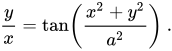
The inspiration for the patterns in this project stems from the Fermat Spiral, given by the equation:

(source: wikipedia)

For the purposes of this assignment, I formatted this equation into the following line of code:

y = tan((x**2 + y**2)/a**2)*x

This sets the y value of the ellipse that will be drawn on the canvas.

I found the Fermat spiral interesting because of its dissimilarity to the Archimedes spiral. So I wanted to incorporate the formula as a starting point for the base of the pattern construction, as I felt like integrating the formula into a dynamic and random template would produce interesting effects.

The magic happens in the equation function that implements the formula. Once the value is input into the equation, its passed to the ellipse function’s y value to generate the ellipse at a given point. Therefore, the logic is quite simple: generate an ellipse n number of times, that is positioned along the y axis using the Fermat spiral formula. This basic function let me be able to create semi-random points in two quadrants. I copied and pasted the for-loops to generate four different mappings of points. This almost created symmetry along the axes, however with some added randomness with the noise and random functions, I was able to create a more interesting visual composition.

For this project, I could have also created a way to generate a custom color palette for each random iteration, and also generate placements based on this color palette. For example, blue would only inherit certain qualities of generation and would thus be generated in only specific sections of the canvas.


Categories
CodeLab

Mini Project 3 – Bill Evans

https://editor.p5js.org/n30w/sketches/evnz4KQZD

I call this project “Bill Evans” because the art that it generates is reminiscent, in my opinion, of the playing style of Bill Evans, a late Jazz pianist. There is a dissonance to the way that the way the images are generated almost cloudy but still visible, and the colors match and yet are dissonant simultaneously, like a patch work of sounds, resolving nicely.

Rectangles generate across the screen according to random values, but follow a pattern governed by a series of trigonometric functions:

8*sin(frameCount), random(5)*cos(frameCount)

and

20*sin(random(noise(frameCount%100)*50,100))

Govern placement of two different rectangles.

Another rectangle that is generated follows a random placement but has the movement pattern similar to the colored rectangles. This white-ish rectangle is used to create a “new” color amongst the already present colors, a technique in real-life painting where blending colors and contrasts of colors creates an effect of complex colors.

Above are three different iterations of the program.

I am a big fan of abstract art, I find that they are more satisfactory pieces of art compared to something that is meant to imitate real life. I therefore wanted to create something in the abstract realm. The use of trigonometric functions did not trouble me at all, since I am a math nut and find math fun and engaging. Weird right. Anyway, I would also like to note that I did not really choose a color palette for this project. I essentially chose a range of random RGB values within a certain range and let the faded white rectangles do the rest of the work in create a varied color palette. I think I will use this idea for future projects.